Windows 11: Computer labs
Guidance and Known issues
National Instruments error
Users may see the following warning. This warning can be ignored and doesn’t affect the operation of the software, so we recommend ticking ‘Don’t show this message again’ then click cancel to prevent it re-appearing during the remainder of your logged in session.
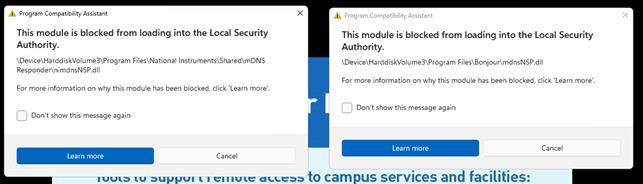
Windows security message when opening Multisim
📢Windows security message when opening Multisim
You may notice the following Windows pop-up when opening Multisim:
This is an expected Windows security message and is linked to a component called Bonjour. It does not prevent Multisim from running and can be safely ignored.
- Click 'Cancel' and continue using Multisim normally.
- If you don't want to see the message again, tick 'Don't show this message again' before closing it.
Please contact IT Services only if Multisim does not start or behaves unexpectedly after the message appears.
OneDrive: First time login
📢 OneDrive: First time login
When you log in to a lab computer for the first time, your user profile is created. During this process, OneDrive will automatically sign in and begin syncing your files, with files downloading only when you open them. Please note that there is no automatic sign in on Mac lab computers, but you will be prompted to sign in to OneDrive after logging in.
Microsoft Office apps such as Word, Excel, and PowerPoint will usually save to OneDrive automatically, but other software files might be stored locally on the computer, especially when using it for the first time.
Saving your files
Files saved only to the lab computer could be lost when you sign out.
To keep your work safe, please make sure you:
- Save files directly to your OneDrive folder whenever possible
- Copy any locally saved files into OneDrive before signing out
- Check that important files have synced ‘saved’ to OneDrive before leaving the computer
We strongly recommend always checking that your files are safely stored in OneDrive before signing out of a lab computer.